Unique QR codes, validated on the spot

Every QR code is good exactly once

Generate unique QR codes from the dashboard or via API, print them on ready-made designs with each person's details, and validate them at the door with the Pinbloom app.
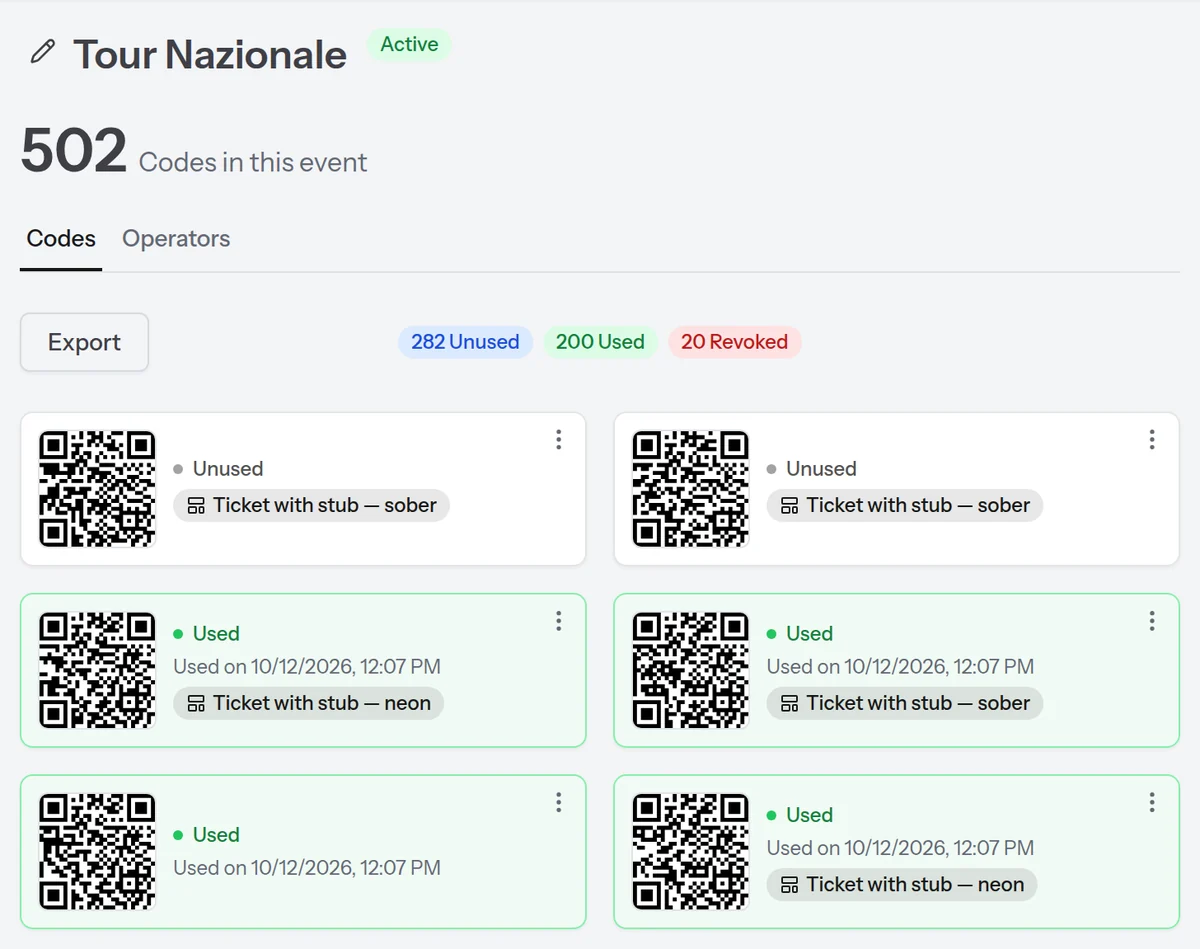
A collection open in Pinbloom: 502 QR codes generated, 282 still unused, 200 used, 20 revoked.

Pinbloom is the tool for validating on the spot entries, goods pickup, coupons, passes and more

Anywhere a code must be good only once

Whether you run an event, a shop or an online store, Pinbloom is the infrastructure that generates unique codes and checks them for you. The same one big events rely on, without building anything from scratch.

Events and entry

Tickets, passes and invitations: everyone gets in once, and you know who came in and when.

Shops and coupons

Flyers and promotions with single-use discounts: the coupon is good once, even if it gets photocopied.

Online shops and pickup

Goods pickup with a QR code or barcode: the person handing over scans it and knows at once whether the pickup is valid.

And much more: gyms, restaurants, memberships, bookings. Anywhere you need a unique code to check.

Create your QR codes on the web

Create the collection

Choose how many QR codes you need, or upload your CSV*. You see a preview of what you are generating.

* Each CSV row becomes one QR code.

Hand them out

Download print-ready PDFs, or single QR code images and graphics to send by email. Whoever receives one installs nothing.

Validate with the app

Your operators validate the QR code with the app*. A code that has been used never becomes valid again.

* Any Android or iOS phone will do.

You can generate plain QR codes, or QR codes inside a graphic template picked from the library. You can also upload your own template (Business plan only).

Create your QR codes or barcodes via API

Call the API

Call the Pinbloom API from your system to generate a QR code or a barcode.

Embed the code

Embed the QR code in your system* and send it to the recipient.

* For example in an order confirmation or an entry ticket.

Validate with the app

Your operators validate the code with the app*. Your system receives the scan result right away.

* Any Android or iOS phone will do.

Do you have an online shop or your own back office? Integrate Pinbloom to generate codes for your own system: summaries, PDFs, emails and more.

QR codes, graphics and PDFs ready to use

Generate QR codes alone, or place them in a library graphic or in your own design. Download single files or a vector PDF ready to print or send to the print shop.

QR codes only

Get the QR codes on their own: single files, or a PDF laid out in columns with every generated code.

Micro Starter Pro Business

Library graphic

Pick a graphic from the library and Pinbloom adds the QR code, and the details if you upload a CSV.

Pro Business

Your own template

Upload your template with placeholders wherever you want them, for the QR code and, if you use a CSV, for each row's details.

Business

We check that the placeholders match the CSV columns and that the QR code stays readable, before anything goes to print.

Operators validate, you stay in control

You create the operators, choose where they can validate, and see every scan. In the field, the Pinbloom app on their phone is all they need.

  1. Add your operators

    Enter a name and an email. They get a confirmation email and sign in to the app with a code.

  2. They sign in with a code

    In the app they enter their email and the code that arrives by email. No password to remember.

  3. They validate in the field

    Green if the QR code is valid, red if it has already been used. If the code carries details, like seat and row, they see them straight away.

operator@example.com EN valid Entry VIP
operator@example.com EN already used on 12 Oct 2026, 08:07 Seats 4 Room 3

Tailored access

Each operator can validate the QR codes of every collection, or only the ones you choose.

Data on the QR code

Seat, row, entry for two: the information you add to the code appears in the app.

Who scanned what

Every scan is recorded with its outcome. You see who validated a code and when.

A QR code when you need it, where you need it

Integrate Pinbloom into your back office or your online shop: generate codes through the API and, on every scan, receive the outcome in your system right away via webhook.

# generate a QR code with the details you want to show the operator curl -X POST https://pinbloom.eu/api/qr/generate \ -H "Authorization: Bearer qrv_live_…" \ -H "Content-Type: application/json" \ -d '{"tag": "order-10492", "displayFields": [{"label": "Name", "value": "Jane Harper"}]}'

Read the documentation → No sign-up: keys, endpoints, sandbox and webhooks are all out in the open.

Reliable webhooks

Every scan reaches your system signed, for the events you choose. If your server does not answer, we retry up to 5 times.

A separate sandbox

Try the integration with a test key: QR codes are not stored and do not touch your quota. With simulate you can even test outcomes like "already used" or "expired".

Keys under control

One key per integration, each with its own webhooks. Regenerate or delete one and the old one stops working immediately.

A plan for every QR code volume

Every plan includes unlimited collections. Choose by the QR codes you generate each month and, if they are not enough, buy the ones you need without changing plan. Purchased QR codes do not reset at month end: they stay yours until you use them.

Try it free for 14 days, no card You get 50 codes and the Micro plan's features. Then choose the plan you need.

Micro

€15/month

or €150/year

150 QR codes a month1 test key · 1 live key · 5 operators

  • Unlimited collections
  • Single PNG and ZIP downloads
  • Not included: API to generate QR codes on demand
  • Not included: Webhooks on live keys
  • Not included: Printing from the template library
  • Not included: Each person's details from a CSV
  • Not included: Upload your own templates

Extra QR codes that do not reset at month end

  • 50 QR codes €6
  • 150 QR codes €17
Get started

Starter

€29/month

or €288/year

500 QR codes a month1 test key · 1 live key · 20 operators

  • Unlimited collections
  • Single PNG and ZIP downloads
  • API to generate QR codes on demand
  • Not included: Webhooks on live keys
  • Not included: Printing from the template library
  • Not included: Each person's details from a CSV
  • Not included: Upload your own templates

Extra QR codes that do not reset at month end

  • 250 QR codes €17
  • 500 QR codes €32
Get started

Business

€249/month

or €2,484/year

15,000 QR codes a month1 test key · 10 live keys · unlimited operators

  • Unlimited collections
  • Single PNG and ZIP downloads
  • API to generate QR codes on demand
  • Webhooks on live keys
  • Printing from the template library
  • Each person's details from a CSV
  • Upload your own templates

Extra QR codes that do not reset at month end

  • 2,000 QR codes €35
  • 10,000 QR codes €175
Get started

Need different volumes?

Bigger events, more operators or special requirements: tell us your numbers and we will prepare a tailored quote, monthly or yearly.

Request a quote

Secure payments with Paddle

Payments, invoices and taxes are handled by Paddle, our Merchant of Record: an authorised reseller that takes care of everything tax-related.

Taxes are calculated at checkout based on your country.

Your next event could already have its QR codes.

From your online shop to QR codes, no code

Plugins for the most popular platforms are in development. In the meantime you can integrate the one you already use through the API.

coming soon W WooCommerce 10+
coming soon M Magento 2.4+
coming soon O Odoo 19+
coming soon P PrestaShop 9+
coming soon S Shopify API 2026-10